
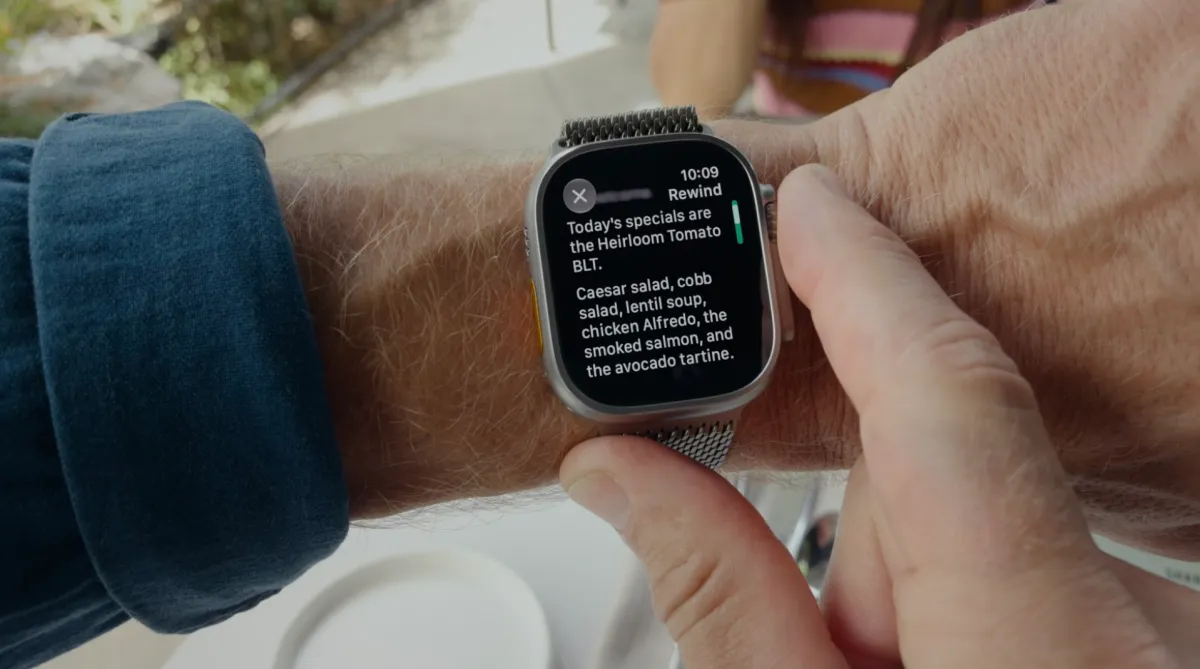

On Tuesday, Apple rolled out a probably controversial set of Audio Intelligence features into testing with the first developer beta versions of iOS 27.3 and watchOS 27.3. The betas carry 4 new AI options that enable Apple Watch Sequence 12 wearers to detect vital sounds, establish songs, compensate for conversations, and take notes.
After only a day with Apple’s Siri Recaps characteristic on my Apple Watch, I can already see how its worth could finally outweigh any creepiness issue that comes from the AI-powered audio recording and summarization it supplies. Nonetheless, I additionally see areas the place AI-assisted note-taking can go too far, capturing issues that aren’t value remembering, and the place there’s room for enchancment.
The primary two, sound and tune detection, don’t characterize potential privateness considerations; they’re designed to detect both vital sounds — like an alarm or doorbell — or establish a tune utilizing Shazam’s expertise. The previous helps deaf and hard-of-hearing customers navigate the world, and the latter is one thing we’ve already executed with our iPhone for almost twenty years now.
It’s the 2 different options, Reside Rewind and Siri Recaps, which have raised considerations. The options report after which transcribe or summarize the conversations occurring with and across the Apple Watch’s proprietor. Reside Rewind enables you to return to see what was mentioned up to now 15 seconds, whereas Siri Recaps summarize audio all through your day, saving notes of the vital issues that had been mentioned.
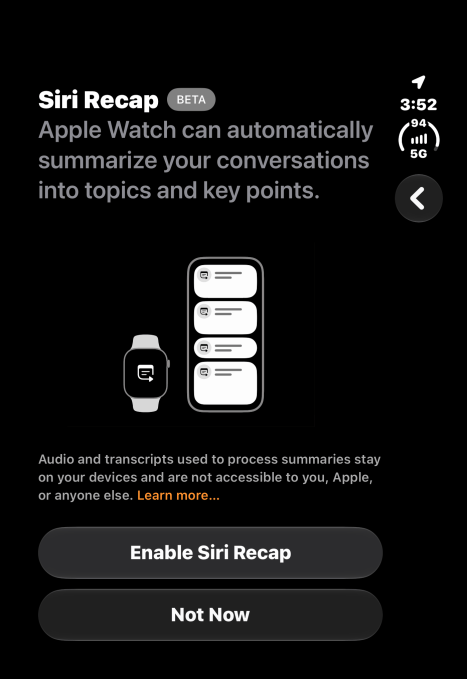
Apple has taken care to make sure the privateness of those AI options by processing the audio and working AI fashions on-device, when potential, and by not figuring out audio system, storing uncooked audio information, and redacting personal info, like authorities ID numbers or private account info.
Nonetheless, some are postpone by the concept that we’re now normalizing the idea that technology is always listening.
I discover myself sympathizing with each camps. I typically lament that we’ve allowed expertise to turn into so pervasive in our each day lives, however I nonetheless see the worth in what Apple has constructed.
I haven’t but had an acceptable time to check Reside Rewind, nor do I believe this might be a characteristic I exploit as typically. I’m extra more likely to say “sorry, what?” or “are you able to repeat that?” if I missed one thing that was mentioned, earlier than turning to my Apple Look ahead to assist.
However with Siri Recaps, I instantly noticed how this might turn into a characteristic I depend on usually to avoid wasting vital notes for later.
I used to be capable of take a look at the characteristic in a real-world state of affairs yesterday, after we had been dropping off my teen’s automobile for repairs and choosing up a rental. At each locations, workers shared numerous details about time frames, costs, and insurance policies that had been delivered verbally. The data got here too quick to cease and write something down. But after I returned to Siri Recaps later within the day, it had captured key particulars that I’ll must refer again to.
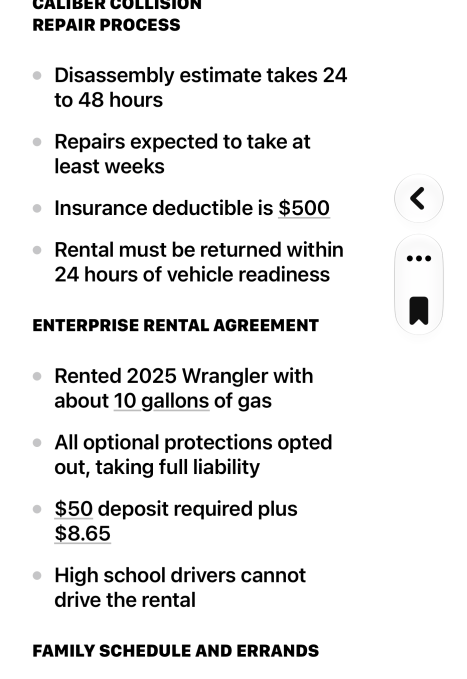
As an illustration, it famous the deductible, the restore timeframe, the quantity of fuel we had within the rental initially, and different issues I needed to recollect.
One criticism is that Siri Recaps had blended this info with different subjects that had been later mentioned within the house, like an errand we wanted to run and what time babysitting was this week, one thing we had been discussing in an effort to create an appointment on the household calendar with an acceptable alert timeframe.
I believe these things ought to have been saved in a separate notice titled “household schedule and errands,” reasonably than in the identical notice with the automobile repairs, however beneath a separate heading.
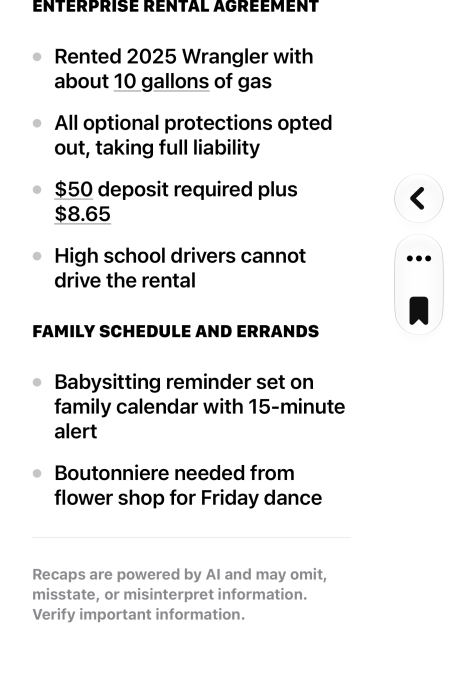
As a result of I configured Siri Recaps to run always, it additionally captured non-essential issues, like our “plan” to observe the midterms protection on TV, which isn’t the form of factor you’d usually jot down a notice about. It additionally was a stark reminder that the characteristic was listening in on our on a regular basis conversations. That’s one thing that might really feel invasive in several eventualities, if the topic being mentioned was extra private in nature.
This had me contemplating turning off the Recap characteristic whereas at house within the night, so household dinner desk chatter doesn’t turn into notice fodder.
Whereas I appreciated that the Recap picked up a reminder about an errand I wanted to run from one of many household conversations, different tidbits it saved — like what we had been watching on TV — would solely be worthwhile for those who had been exporting a Siri Recap notice to Apple’s Journal app, as a result of it was one thing you needed to report for private causes.
I’d prefer to see these types of extraneous particulars saved as separate notes — or a minimum of as devoted sections that might be exported or deleted on their very own on the finish of the day.
I’d additionally love to have the ability to swipe left on a person bullet level to take away it from the Siri Recap fully, reasonably than having to enter edit mode, place the cursor, after which begin deleting the textual content I don’t want.
Another choice I’d prefer to have can be a setting that might help you routinely export any saved Siri Recap (those you click on the bookmark icon to avoid wasting) to Apple’s Notes app, as a substitute of that being an additional step.
These Recaps may go into their very own folder within the Notes app for simple reference. I can perceive why this selection will not be the default, given what number of other ways individuals use a general-purpose app like Notes. Nonetheless, it might be helpful for these of us who need to preserve Notes because the central place to begin for all our jotted-down reminders and to-dos.
Although I wasn’t instantly warmed as much as the concept that my Watch was all the time listening, so to talk, I see the worth of this kind of automated note-taking in each day life.
Once you buy via hyperlinks in our articles, we may earn a small commission. This doesn’t have an effect on our editorial independence.